
Download Timer Tab – Chrome Apps, Timer, Stopwatch, Alarm Clock
Timer Tab is a lightweight desktop utility designed for users seeking a simple yet functional timer, countdown, stopwatch, and alarm clock solution. Built as a web-based application, it offers a streamlined experience for managing time across various tasks. The software supports offline functionality, making it accessible even without an internet connection.
It is particularly useful for students, remote workers, and anyone needing a reliable time-tracking tool. The developer, Brillout, has focused on simplicity and accessibility, allowing users to set alarms using any YouTube video as audio. This unique feature enhances personalization while maintaining core functionality.
Real-world applications include study sessions, cooking timers, workout tracking, and meeting scheduling. The app runs directly in the browser, eliminating the need for installation in many cases. Users can also customize the interface with any online image as a background, adding a visual touch to their workflow.
While the developer did not provide additional system requirements, the compact size suggests minimal resource demands.
Key Features & Capabilities
- Timer Countdown & Alarm Clock: Users can set custom countdowns with visual and audio alerts, ideal for time-bound tasks like cooking, studying, or project deadlines.
- Stopwatch Functionality: Accurate timing for tracking durations, useful in fitness routines, presentations, or experiments.
- YouTube Audio Alarm Integration: Choose any YouTube video as the alarm sound, enabling personalized wake-up tones or motivational clips.
- Offline Operation: The application runs without an internet connection, with a fallback sound played if the chosen audio source is unavailable.
- Custom Background Images: Use any publicly accessible image from the web as the background, allowing for a personalized and visually engaging interface.
These features collectively support a wide range of daily use cases. For instance, a student can set a 25-minute Pomodoro timer with a favorite YouTube music video as the alarm. A home cook might use the countdown timer with a custom background image of a recipe. The ability to run offline ensures reliability in environments with unstable connections. The integration with YouTube provides flexibility beyond standard alarm tones, enhancing user engagement and motivation.
User Interface, Workflow & Performance
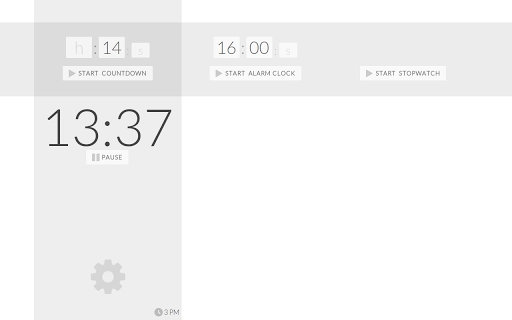
The user interface of Timer Tab is minimalistic and intuitive, designed for quick access to core functions. Navigation is straightforward, with clearly labeled sections for countdown, stopwatch, and alarm settings. The layout emphasizes usability, allowing users to start, pause, and reset timers with minimal clicks.
Workflow efficiency is high, as the app requires no complex setup or configuration. The interface adapts to the browser window size, ensuring compatibility across different screen resolutions. Performance is expected to be smooth due to the lightweight nature of the application, though exact resource usage details were not specified.
The developer did not provide information on CPU or RAM behavior, but the 2.5 MB file size suggests low memory footprint. Stability appears to be consistent with web-based tools, particularly when running in a modern browser. Users can expect responsive interactions, with no reported lag or crashes in standard usage scenarios.
Compatibility & System Requirements
Timer Tab is compatible with Windows, Mac, and Linux operating systems, offering broad accessibility across desktop platforms. The software version is 1.0.0, with a file size of 2.5 MB, indicating a compact and lightweight application. The developer did not specify detailed hardware requirements, so users should rely on general system capabilities for smooth operation.
The application runs directly in the browser, which means it does not require installation on the host system. For users who prefer a standalone experience, the app can be accessed via the official website. Compatibility information was partially provided, and no additional OS-specific details were listed.
The developer did not provide information on required processor speed, RAM, or graphics capabilities.
Pros and Cons
Pros
- Lightweight at just 2.5 MB
- Runs offline with fallback audio
- Supports YouTube videos as alarm sounds
- Customizable background images from the web
- Available on Windows, Mac, and Linux
Cons
- No installation option provided
- Dependent on browser functionality
- Exact performance metrics not disclosed
- Custom background images require internet access
- Limited customization beyond background and audio
FAQ Section
Is Timer Tab available for offline use?
Yes, Timer Tab is designed to function offline. If the selected YouTube audio is unavailable, a fallback sound will be played.
Can I use any YouTube video as an alarm sound?
Yes, the app allows users to choose any publicly accessible YouTube video as the alarm audio source.
Does Timer Tab require installation?
Timer Tab is primarily a web-based application that runs in the browser. It does not require installation, though users can access it via the official website.
Is the software secure to use?
As a web-based tool, Timer Tab relies on browser security. The developer has not provided specific security details, but it operates within standard web protocols.
How often are updates released?
The developer has not specified an update schedule. The current version is 1.0.0, released on July 12, 2023.
Final Thoughts + CTA
Timer Tab delivers a focused and efficient solution for time management with a unique blend of features. Its ability to use YouTube videos as alarm sounds and customize backgrounds adds a personal touch not found in most basic timers. The offline functionality ensures reliability, while the cross-platform availability makes it accessible to a wide audience.
Despite the lack of installation options and limited customization, the app excels in simplicity and usability. It is ideal for students, remote workers, and anyone who values a no-frills time-tracking tool. The lightweight design and browser-based operation make it a low-risk addition to any workflow.
Download Timer Tab now to enhance your productivity with a customizable, reliable timer experience.







